FPL
- 4.2
- Rating
- 1.00M
- Installs
- Free
- Price

 Analysis by App-foxy
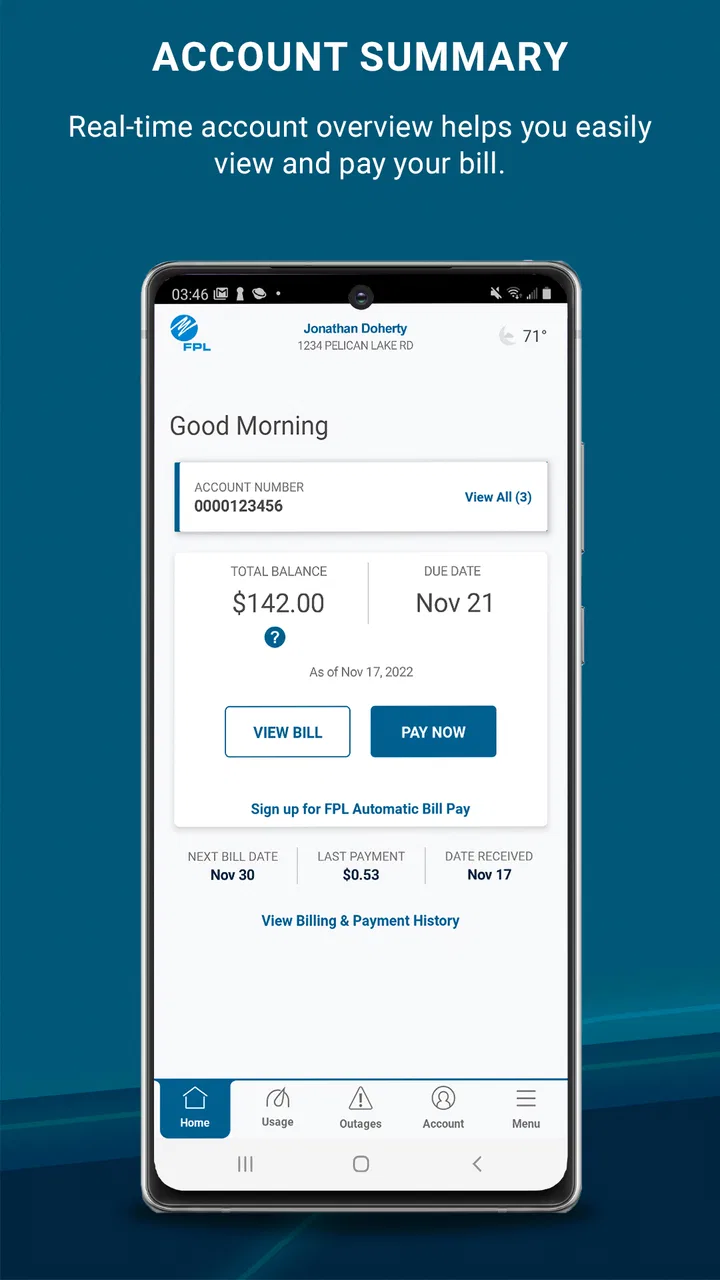
Managing a power account is rarely something I want to spend much time on. I usually open an app like this with one clear purpose: check what I owe, understand a recent charge, or take care of an account task before it slips my mind. FPL Mobile is built for that kind of quick visit. It is a free business app from NextEra Energy, Inc., designed for FPL customers who want access to their account away from a desktop browser.
After using it as an account-management tool rather than expecting it to be an all-purpose utility dashboard, I found its appeal fairly straightforward. It puts the customer relationship with Florida Power & Light into a mobile format, which is useful when I am away from home or simply do not want to open a computer. The app has an average rating of 4.3 from around 20 thousand ratings, with more than 7 thousand written reviews, and it has passed the one-million-install mark. That level of adoption suggests it is familiar to a large number of customers, although popularity alone does not make every interaction perfect.
What using FPL Mobile feels like in everyday situations
The best way to understand this app is to picture a normal household task. I might be standing in a grocery-store line and remember that I have not checked the latest electric bill. Instead of waiting until I get home, I can open FPL Mobile, sign in, review the account information available there, and decide whether I need to act immediately. That is a small convenience, but it is exactly the kind of convenience a utility app should provide.
You May Also Like

 Blood Strike: 2.5 Anniversary
Blood Strike’s Loadouts Turn Every Drop Into a Tactical Gamble
A close look at Blood Strike’s custom loadouts: how fast access to signature weapons reshapes its battle royale rhythm, rewards preparation, and narrows the gap between fights.

 Pandora - Music & Podcasts
Pandora’s Music Is Easy to Start, but Harder to Recover
Pandora’s strength is its low-effort path from a seed to a station. Its weak spot is how much confidence it asks you to place in connection, setup, and quiet recovery.

 8 Ball Pool
 Is Built on Rivalries, Rematches, and Routine
A close look at the rivalries, rematches, shared routines, and unanswered safety questions that turn a quick pool match into a persistent mobile community.

 Samsung Music
’s Quiet Strength Is Playing What You Already Own
Its reach comes less from spectacle than from dependable access to a personal library. That simplicity is both the app’s strongest retention engine and its ceiling.

 AccuWeather: Weather Radar
AccuWeather Review: A Quick, Clear Forecast for Everyday Decisions
For everyday plans, the best forecast is the one you can understand quickly. AccuWeather makes rain timing, radar, and local conditions easy to act on, with a few trade-offs.

 Hill Climb Racing
Why Hill Climb Racing Still Turns Crashes Into One More Run
A tiny car, a bumpy hill and one more upgrade: Hill Climb Racing keeps resurfacing because its simple chaos makes every near-miss feel personal.
More From Our News Desk



It is also useful when I need to deal with an account while traveling. A desktop website may offer a broader layout, but a phone is usually closer at hand. If I am staying with family, working from another location, or handling household administration during a busy day, having the account in a mobile app reduces the number of steps between remembering a task and completing it.
The app is categorized as a business tool, which makes sense because its purpose is practical rather than recreational. There is no reason to open it casually. I use it when I need account access, and I close it when that job is done. That focused design is a strength for customers who want a direct route to their utility information, but it also means anyone expecting a broad personal-finance experience may find the scope narrow.
Speed expectations: good for short account checks
My expectations for FPL Mobile are different from those I would have for a game or a media app. It does not need to animate constantly or process large files. What matters is whether it gets me from opening the app to the relevant account screen without making a simple task feel like a project.
For short visits, the mobile format is naturally convenient. I can use it to check the current state of my FPL account without sitting at a full-size computer. The most important performance advantage is not flashy speed; it is the reduction in friction. When an app keeps the account experience close at hand, I am more likely to deal with a bill or account question promptly instead of postponing it.
There is an important distinction here. The app can make access faster, but it cannot make every account-related process instant. Some information depends on the service behind the app, account authentication, and the response from FPL systems. If a screen takes time to load, that does not necessarily mean the phone is struggling. In practical use, I judge it by whether the overall visit feels reasonable for a utility account rather than by expecting every page to appear immediately.
One useful habit is to open the app before I need it urgently. Signing in during a calm moment helps me avoid discovering an account-access problem when I am already trying to resolve a payment or billing concern. This is a simple workflow improvement, but it matters more with a utility app than with an app I use only for entertainment.
Heavy-use moments and the limits of a mobile utility tool
FPL Mobile is most likely to feel busy when I am doing more than a quick check. A longer visit might involve reviewing several pieces of account information, moving between screens, or trying to understand why a charge looks different from what I expected. Those moments put more pressure on navigation and account loading than a single glance at the home screen.
I would not choose a phone app as my only place for careful household record-keeping. If I am comparing multiple bills, preparing a budget, or trying to read a lot of detail, a desktop browser gives me more room and makes side-by-side review easier. The mobile app is better for checking and acting; the larger screen is better for studying patterns.
That trade-off is easy to overlook. A mobile account tool can feel efficient because it is always nearby, but convenience can encourage me to make decisions too quickly. For example, if I am investigating a higher bill, I should take time to review the relevant account details instead of relying on a quick glance. The app helps me reach the information, while the quality of the conclusion still depends on how carefully I read it.
Another practical use is handling account administration while away from a computer. If I receive a reminder that I need to review something, I can start the process on my phone rather than waiting for a convenient desktop session. When the task is simple, that is a genuine advantage. When it involves extensive comparison or documentation, I prefer switching to the usual web alternative.
The strongest workflow is to use the phone for access and immediate action, then use a larger screen when the account needs careful investigation. That division keeps the app in the role where it is most useful instead of judging it against tools designed for a different kind of work.
Reliability: useful access, with sensible backup habits
Reliability for an account app has two sides. First, I want the application to open and present a coherent path to my account. Second, I need the underlying service to respond when I am trying to complete something important. FPL Mobile is valuable because it gives FPL customers a dedicated mobile route, but I would still keep the normal web route in mind for situations where the app does not behave as expected.
That is not a criticism unique to this product. Any account app can encounter an awkward login, a delayed response, or a screen that needs to be refreshed. The sensible approach is not to depend on one access method for an urgent deadline. If I am handling something time-sensitive, I check that the action has actually completed rather than assuming that tapping a button means the account has updated.
I also recommend keeping basic account information available in a secure place outside the app. I do not mean leaving sensitive details in an exposed note. I mean knowing which email address or sign-in route is associated with the account and keeping track of the normal recovery process. This makes the app easier to use when I change phones, reinstall it, or encounter an authentication problem.
The app’s long presence is another part of its practical identity. It was released on June 5, 2017, and the current version is 6.28.0. I see that history as reassuring in one limited sense: this is not a brand-new experiment that customers have only just started using. At the same time, a mature app can accumulate revisions and interface changes, so I still pay attention to how a current update behaves on my particular device.
For a utility account, stability matters more than novelty. I would rather have a predictable route to account information than a collection of decorative features. FPL Mobile generally makes the most sense for someone who values that focused purpose and is willing to use the browser as a fallback when a more involved task calls for it.
Device constraints and what the age rating means in practice
The listed minimum operating-system requirement is Android 6.0, which makes the app accessible to a wide range of Android devices. That does not guarantee identical performance on every phone. Older hardware may take longer to open apps, switch screens, or handle account pages, while newer devices are more likely to feel immediate. Network quality can also matter as much as the handset when account information must be retrieved online.
For that reason, I would not judge the experience solely by the age of the phone. A device with limited free storage, an outdated system environment, or an unreliable connection may make any account application feel less responsive. Before blaming FPL Mobile, I would check whether other online apps are also slow and whether the phone has enough room for normal updates.
The Everyone content rating is appropriate for a household utility account app. It does not turn the application into a child-focused product, though. The account itself may contain private billing and service information, so I would treat the phone as a personal device and use the device’s normal security protections. Anyone sharing a phone should be especially careful about leaving an account session open.
Resource demands are best understood in context. This is not the kind of app I install for continuous background entertainment, and I have no reason to keep it open all day. Its sensible use pattern is open, complete the account task, and close it. That limits unnecessary battery use and keeps the app from becoming another source of clutter. If I only need occasional access, I would avoid treating it like a constantly active dashboard.
People with very old phones should also consider screen size and typing comfort. Entering account credentials or reading detailed billing information on a small display can be more tiring than using a browser on a computer. The app may still be convenient for a quick check, but the desktop alternative is better when accessibility, enlarged text, or extended reading is important.
Where it beats the usual alternatives
The usual alternative is the FPL website in a mobile browser. That route can be preferable when I want a wider layout, easier browser-based navigation, or a more traditional desktop experience. It is also a sensible fallback if the installed app is unavailable or if I am using a device where installing another application is inconvenient.
FPL Mobile has the advantage of being a dedicated entry point. I do not have to begin with a browser search or remember which page leads to account access. For repeat tasks, that directness is meaningful. I can reach for the same app whenever I need to check the account, which makes the process feel more like a routine than a small research task.
On the other hand, a general budgeting app is not a replacement for it. Budgeting tools may help me track household spending across categories, but they are not the natural place to access FPL account information. I would use a budgeting app to interpret the cost in my broader finances and FPL Mobile to deal with the utility account itself.
This is also not the right choice for someone who does not have an FPL account. The app’s value comes from the relationship with that specific utility provider. A customer of another electricity company should use that company’s official account channel instead of installing an app that does not serve their account.
Three practical habits that make the app more useful
First, I use the app as an early-warning check rather than waiting until a deadline is close. A quick visit during a weekly household-admin routine can help me notice account information that deserves a closer look. The point is not to stare at the app constantly; it is to make account awareness part of an existing routine.
Second, I separate verification from investigation. If I am checking whether an account action went through, I look for a clear updated state before closing the app. If something looks wrong, I do not keep tapping randomly. I record what I saw, note when I checked it, and move to a larger screen or another official support route if the issue needs more context. This avoids turning a confusing screen into repeated, uncertain actions.
Third, I keep the app’s role narrow when managing a household budget. I use FPL Mobile for the source account and a separate budgeting method for comparing utility costs with rent, groceries, or other bills. Mixing those jobs inside one small-screen session makes it harder to tell whether I am checking a fact or making a financial judgment.
A fourth habit is especially useful after changing devices: I test access before the first urgent need. I make sure I can reach the sign-in flow, recognize the account, and understand where the important information appears. That short preparation can save time later, particularly when I am away from my usual computer.
Who should use it, and who should skip it?
I recommend FPL Mobile to FPL customers who want a convenient mobile way to reach their account. It is a good fit for people who handle household administration from a phone, travel regularly, or prefer completing small account tasks immediately instead of waiting for a desktop session. The free price removes a common barrier, and the Everyone rating makes it suitable for ordinary household use.
I would be more cautious about recommending it as the only account-management method to someone who does detailed billing analysis. If I need to compare long stretches of account information, print records, or work with several windows open, the website on a computer is more comfortable. The same is true for users with very small screens, older hardware, or a preference for avoiding dedicated apps.
It is also a poor fit for anyone looking for a complete energy-management or personal-finance platform. Its purpose is access to an FPL account, not a replacement for a budgeting system or a general household dashboard. That focused scope is a benefit when it matches the need and a limitation when it does not.
Performance verdict after regular account use
My overall view is positive, but deliberately practical. FPL Mobile succeeds because it puts a specific account within reach when I am using a phone. Its speed expectations are reasonable for short online account visits, its resource demands should be modest when used only as needed, and its mature release history gives it the feel of an established utility companion rather than a temporary experiment.
The important qualification is that no mobile app should be the only plan for a time-sensitive account issue. I keep the browser route available, read account information carefully, and confirm that important actions have actually completed. Those habits address the main weaknesses of mobile account management without taking away its convenience.
FPL Mobile is free, works on Android versions starting with 6.0, and is maintained by NextEra Energy, Inc. Its current version is 6.28.0, and the broad user base reflected by over one million installs makes it an easy option to consider for eligible FPL customers. If you want a straightforward phone-based way to reach your FPL account, I would install it; if you need deep financial analysis, I would pair it with the website and a separate budgeting tool.
FAQs for FPL
01What is FPL and what does it offer to users?
FPL, short for Fantasy Premier League, is a popular fantasy sports app that allows users to create and manage their own virtual football teams using real-life Premier League players. It offers features like player transfers, live match updates, and performance tracking, providing football fans a platform to engage with the sport in an interactive and competitive way.
02Is FPL free to play, or are there any in-app purchases?
FPL is free to download and play, allowing users to enjoy the core features without cost. However, certain premium features, such as advanced analytics or exclusive leagues, might require in-app purchases. These optional purchases can enhance the gaming experience but are not necessary to enjoy the full scope of the app.
03Can I play FPL with my friends or join public leagues?
Yes, FPL allows users to create private leagues to compete with friends, family, or colleagues. Additionally, users can join public leagues to compete against players from around the world. This feature enhances the social aspect of the game, making it more engaging and competitive.
04How often are player statistics and scores updated in FPL?
Player statistics and scores in FPL are updated live during Premier League matches. The app provides real-time updates on player performances, allowing users to make informed decisions regarding transfers and team management. This ensures an accurate and dynamic gaming experience.
05What devices are compatible with the FPL app?
The FPL app is available for both Android and iOS devices, ensuring a wide range of compatibility. Users can download the app from the Google Play Store or Apple App Store. It requires a stable internet connection to access live updates and make real-time decisions during the game.
Pros
- User-friendly interface for easy navigation.
- Real-time score updates enhance engagement.
- Customizable team selection options.
- Comprehensive player statistics available.
- Frequent updates with new features.
Cons
- Requires constant internet connection.
- Notifications can be overwhelming at times.
- Occasional lag during peak usage.
- Limited support for offline play.
- Ads can be intrusive without premium.

FPL
Gallery